Local Stable Diffusion WebUI API Guide
Running Stable Diffusion locally allows you to generate portraits and scenes directly on your own computer graphics card. This runs 100% offline, costs nothing, and is completely uncensored.
We strongly recommend Stable Diffusion WebUI Forge (or AUTOMATIC1111). The mod communicates with your local WebUI through its built-in API, sending scene prompts and receiving generated artwork in real-time for both Course of Temptation and Shady Deals.
Advantages & Limitations
- 100% Free: No subscriptions, no credits, no recurring costs.
- Completely Offline & Private: Generations are processed on your local GPU; no data ever leaves your computer.
- Uncensored: Total freedom over models, checkpoints, LoRAs, and art styles.
- Custom LoRAs Supported: Apply character-specific LoRA networks directly from within the mod.
- Requires a Dedicated GPU: Needs an NVIDIA (or compatible) graphics card with at least 6GB to 8GB+ of VRAM.
- Initial Download Size: Checkpoint models range from 2 GB to 7 GB+ each.
- System Heat & Power: Generating multiple portraits back-to-back puts significant computational load on your graphics card.
VRAM Tiers & Suggested Checkpoints
| VRAM Available | Recommended Model Type | Recommended Checkpoints | Best For |
|---|---|---|---|
| 4 GB – 6 GB | SD 1.5 (Lightweight) | DreamShaper v8, Deliberate | Fast, lightweight generations on older graphics cards. |
| 8 GB – 12 GB | SDXL / Pony (Standard) | Pony Diffusion V6, AutismMix, Animagine XL | High-quality anime and stylized portraits. |
| 8 GB – 12 GB | Photorealistic Checkpoints | Z-Image Turbo NSFW, CyberRealistic XL | Gritty realism, suited for Shady Deals or realistic CoT styles. |
| 12 GB – 16 GB+ | SDXL with High-Res Fix | Pony Diffusion V6, Illustrious XL | Ultra-high resolution and fine detail. |
Recommended Generation Settings
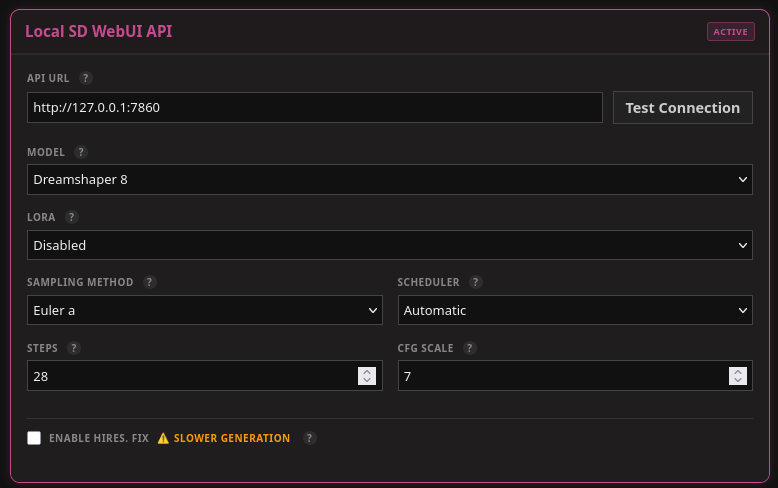
Recommended settings vary by checkpoint model family. If you are unsure, these general baselines work well:
| Parameter | Standard SDXL / Pony Models | Fast Turbo / LCM / ZIT Models |
|---|---|---|
| Sampling Steps | 20 to 28 |
4 to 8 |
| CFG Scale | 5.0 to 7.0 |
1.0 to 2.0 |
| Sampling Method | Euler a or DPM++ 2M Karras |
Euler a |
| Hires. Fix (Optional) | Denoise 0.45 – 0.55, Upscale 1.5x |
Disabled (for speed) |
Step-by-Step Setup Guide
We recommend using Stability Matrix to install and manage WebUI Forge, models, and launch arguments with a single click.
Step 1: Install Stability Matrix
- Download Stability Matrix for your OS from GitHub.
- Extract the file and run it. Choose an installation drive with ample free storage (each model requires several gigabytes).
Step 2: Install Stable Diffusion WebUI Forge
- In Stability Matrix, click on the Packages tab on the left sidebar.
- Click Add Package and select Stable Diffusion WebUI Forge - Neo (Forge is significantly faster and uses less VRAM than vanilla AUTOMATIC1111).
- Follow the installation prompt to finish the install.
Step 3: Download a Checkpoint Model
- In Stability Matrix, click the Model Browser tab.
- Search for your preferred model (e.g.,
Pony Diffusion V6for anime orZ-Image Turbofor realistic styles) and click Download. - If downloading directly from Civitai or Hugging Face, place the
.safetensorsfile into<Your-Folder>/Models/DiffusionModels(ormodels/Stable-diffusion/).
Step 4: Configure Launch Arguments (Mandatory for Mod Connection!)
Because SugarCube games run inside a web browser, browser security rules prevent the game from communicating with your local server unless API mode and CORS are enabled:
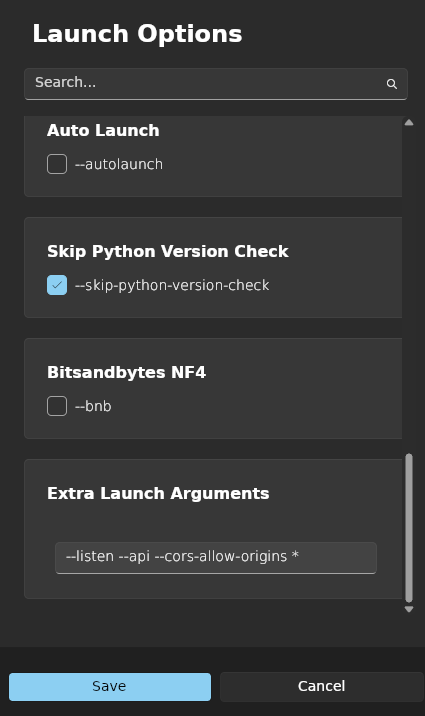
- Go to the Packages tab in Stability Matrix.
- Click the Gear Icon next to the Forge package launch button.
- In the Extra Launch Arguments text box, enter:
- Save the configuration.
(If you are launching Forge via webui-user.bat or webui-user.sh without Stability Matrix, edit the file in Notepad and add set COMMANDLINE_ARGS=--api --cors-allow-origins=*).
Step 5: Start the Server & Connect the Game
- Click Launch on your Forge package.
- Wait for the terminal console to show that the WebUI has finished loading (typically at
http://127.0.0.1:7860). - Launch your patched game in your browser (
CourseOfTemptation.patched.htmlorShady Deals.patched.html). - Open the Settings modal (
⚙️), go to the Image Generators tab, expand Local Stable Diffusion, and set the API URL tohttp://127.0.0.1:7860. - Click Test Connection. The mod will verify the connection and automatically populate the Model dropdown with all checkpoints installed in your WebUI!
- Select your checkpoint model and click Save Settings.
Using LoRAs
The mod has built-in support for applying custom LoRAs (Low-Rank Adaptations) to your local generations:
- Auto-Populated Dropdown: Clicking Test Connection queries
/sdapi/v1/lorasand automatically populates the LoRA dropdown with all.safetensorsfiles installed in your WebUI'smodels/Lora/directory. - LoRA Trigger Word: An optional trigger phrase (e.g.
artbyartist, vibrant anime) placed immediately before the LoRA tag. - LoRA Weight: A numeric multiplier between
0.0and1.0(default:1.0) controlling the strength of the LoRA effect. - Per-Character LoRAs: In addition to global LoRAs, you can assign character-specific LoRAs to individual characters by opening their portrait in the lightbox and adding
<lora:name:0.8>to their custom keywords (🏷️)!