General Prompt Settings & Styles
This guide explains the universal prompt settings configured in the mod's Prompt Generators tab. These settings shape the aesthetic direction, detail level, and model compatibility of generated prompts across both Course of Temptation and Shady Deals.
Core Settings Overview
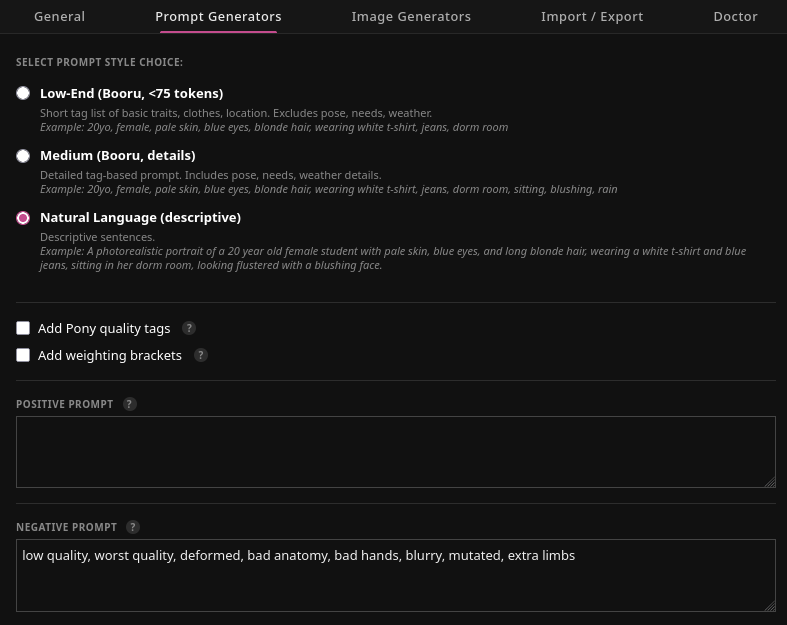
Open the Settings modal (⚙️) and navigate to the Prompt Generators tab to configure these options:
| Setting | Recommendation | Description |
|---|---|---|
| Image Style | Model-dependent | Controls the overarching visual aesthetic (e.g. Anime, Realistic Photo, Candid Snapshot, Retro Polaroid, Cinematic, Watercolor). |
| Prompt Style | Model-dependent | Controls how prompts are formatted: Low-End for short tag lists (older SD 1.5 checkpoints); Medium for balanced tag combinations; Natural Language for descriptive sentences (ideal for modern SDXL, Flux, and LLM prompting). |
| Pony Quality Tags | Model-dependent | Enable only if you are using a Pony-based checkpoint model. Automatically prepends Pony quality score prefixes (e.g. score_9, score_8_up...). Disable for non-Pony models. |
| Add Weighting Tags | Model-dependent | Wraps emphasis tags in standard weight syntax (e.g. (masterpiece:1.2)). Supported by SD WebUI Forge and ComfyUI. |
| Positive Prompt | Optional | Custom positive keywords or tags automatically appended to all generated prompts (e.g. masterpiece, highly detailed, film grain). |
| Negative Prompt | Optional | Custom negative keywords or tags to avoid during image generation. Standard quality negatives are automatically injected based on image style. |
Deterministic Prompt Seeds
Looking to generate reproducible LLM prompts? You can freeze the text prompt generation seed in the General Settings tab under Deterministic Seeds (Optional). This applies to both OpenRouter and OpenAI-compatible backends.
Available Image Styles Breakdown
The Image Style selector automatically tailors introductory prompt framing, descriptive tags, negative prompts, and NovelAI presets:
| Image Style Preset | Aesthetic Description | Key Tag Injections & Intro Framing | Recommended For |
|---|---|---|---|
| Anime (2D) | Classic 2D Japanese anime illustration with bold lines and vibrant colors. | Standard anime tags, natural language anime scene framing. | NovelAI, Pony Diffusion, Animagine XL |
| Realistic Photo | High-fidelity photorealistic studio photography. | photorealistic, raw photo, realistic skin texture, sharp focus |
SD WebUI Forge (Z-Image Turbo, CyberRealistic), Flux.1 |
| Realistic Anime / 2.5D | Sophisticated blend of anime facial aesthetics and soft realistic skin textures. | semi-realistic, 2.5d, realistic anime, soft shadows, detailed skin texture |
Pony models, Illustrious XL, Perchance AI |
| 3D CGI / Game Render | Video game CGI cutscene character rendering. | 3d render, octane render, unreal engine 5, sub-surface scattering |
3D-styled checkpoints |
| Candid Photo | Natural, unposed snapshot with authentic ambient lighting. | candid photo, unposed, natural lighting, 35mm photo, realistic skin pores |
Shady Deals characters, casual scenes |
| Retro Polaroid / Vintage | Authentic 1990s instant Polaroid film aesthetic with warm tones and grain. | polaroid photo, retro 1990s photo, vintage film, film grain, light leak |
Nostalgic or vintage character portraits |
| Cinematic Film Still | Movie screenshot with dramatic volumetric lighting and depth of field. | cinematic still, movie screencap, dramatic lighting, depth of field, bokeh |
Story event illustrations in CoT, dramatic deals in Shady Deals |
| Studio / Glamour Portrait | Professional fashion studio photo with softbox rim lighting. | studio portrait, fashion photography, rim light, softbox lighting |
High-fashion outfits, formal events |
| Oil Painting | Traditional classical fine art painting on canvas with visible brushwork. | oil painting, visible brush strokes, impasto texture, canvas texture |
Artistic character renders |
| Watercolor Illustration | Delicate traditional watercolor painting with soft pastel edges. | watercolor painting, soft edges, paint splatters, textured paper |
Stylized storybook illustrations |
| No Style | Pure, unstyled description of character, clothing, and scene without medium, render, or photographic style keywords. | None (Description only) | Custom style LoRAs, heavily stylized models, or minimalist prompting |
Using Style LoRAs & Heavily Styled Models
If you generate portraits using a dedicated style LoRA (e.g. watercolor, comic book, retro pixel art, or a specific artist LoRA) or a checkpoint model that is already heavily stylized out-of-the-box, select No Style.
When No Style is active:
* The prompt generator outputs strictly descriptive content: physical traits, hairstyles, skin tones, eye colors, outfits, expressions, and locations.
* Introductory medium framing (e.g. An anime digital illustration..., A photorealistic portrait...) and concluding style keywords are omitted entirely.
* When using LLM prompt generation, the assistant receives strict negative constraints against injecting artistic medium or photographic tags, preventing prompt conflicts with your style LoRA or checkpoint.
Matching Styles to Games
- For Course of Temptation:
- If using anime checkpoints or NovelAI, choose Anime (2D) or Realistic Anime (2.5D).
- If using realistic checkpoints, choose Realistic Photo or Candid Photo.
- For Shady Deals:
- The gritty, realistic themes of Shady Deals pair wonderfully with Realistic Photo, Candid Photo, or Cinematic Film Still.